Terminal Commands Plugin
Overview
The Terminal Commands plugin lets you save shell commands and run them from Modern CSV. You can pass via flags file data and metadata.
Commands run in the Console panel's Terminal tab. Before running, Modern CSV expands placeholders such as {filepath:arg}, {cell:arg}, and {selection:args} using the active file and selection.
Each command has:
- Terminal Command Syntax: The shell command to run.
- Terminal Command Shortcut: Optional keyboard shortcut.
- Terminal Command Name: Optional title shown in the Terminal Commands panel.
User Interface
There are several ways to interact with the Terminal Commands plugin:
- Main Window Commands - Commands found in the Tools/Terminal Commands menu or in the Command Launcher.
- Terminal Commands Manager - Found in the Utilities panel on the right side.
- Terminal Console - A terminal found in the Console panel.
Main Window Commands
These commands are available from the Tools/Terminal Commands menu and the Command Launcher in the main window:
| Command | Notes |
|---|---|
Add Terminal Command |
|
Duplicate Terminal Command |
After duplicating, you can change the new one's name, shortcut, or syntax. |
Edit Terminal Command |
Change an existing terminal command's name, shortcut, or syntax. |
Open Terminal |
The terminal opens in the Console panel. |
Remove Terminal Command |
|
Run Terminal Command |
You can save commands for frequent use and assign them names and keyboard shortcuts.
Terminal Commands Manager
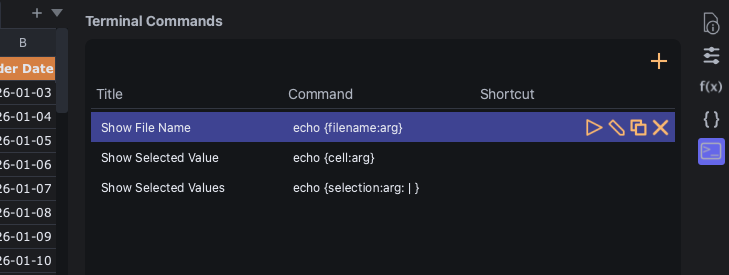
The Terminal Commands Manager panel lists all of your saved terminal commands. It's part of the Utilities panel on the right side of the main window.
Click the + button at the top to create a new terminal command.
Double-click the Title, Command, or Shortcut column to edit that field.
Each terminal command in the list shows its display name along with the following buttons:
| Button | Command |
|---|---|
 |
Run Terminal Command |
 |
Edit Terminal Command |
 |
Duplicate Terminal Command |
 |
Remove Terminal Command |
Saved commands can also be run with their keyboard shortcuts.
Terminal Console
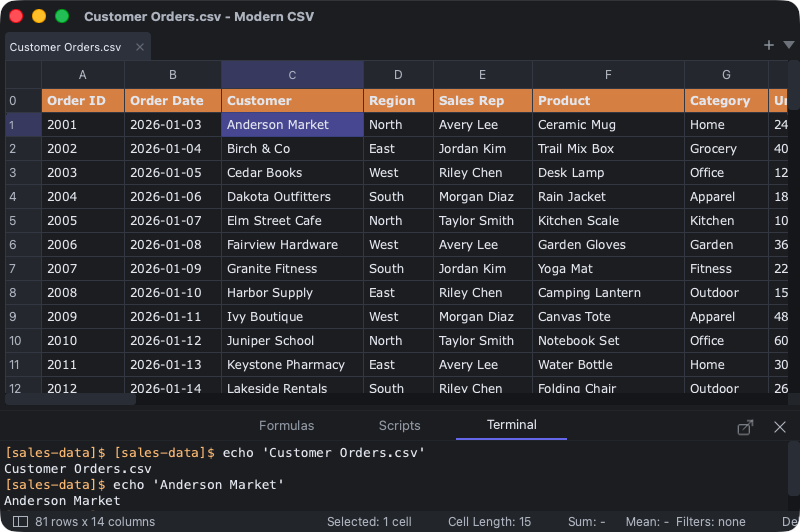
The Terminal Console is an embedded console in the Console panel. It displays the output of terminal commands and you can type commands directly into it.
It is not a full terminal emulator, so some terminal programs may behave differently from a native terminal. In Windows, commands run through cmd.exe /c. On Mac and Linux, it runs commands on /bin/sh -c.
Command Syntax
Use :arg when passing file names or cell values to another program. It escapes the value as one shell argument.
| Placeholder | Inserts |
|---|---|
{filename} |
Current file name. |
{filepath} |
Current file path. |
{folderpath} |
Current file's folder path. |
{row} |
Main selected cell row. |
{col} |
Main selected cell column. |
{cell} |
Main selected cell value. |
{selection} |
Selected cell values, joined with ,. |
Escaped forms:
| Placeholder | Use |
|---|---|
{filename:arg} |
Current file name as one shell argument. |
{filepath:arg} |
Current file path as one shell argument. |
{folderpath:arg} |
Current folder path as one shell argument. |
{cell:arg} |
Main selected cell as one shell argument. |
{selection:arg} |
Selected values joined into one shell argument. |
{selection:args} |
Each selected value as its own shell argument. |
Custom selection separators:
{selection:;}
{selection:|}
{selection:\t}
{selection:tab}
{selection:\s}
{selection:space}
{selection:\n}
{selection:newline}
{selection:none}
{selection:, }
{selection: | }
You can combine separators with escaped selection forms:
{selection:arg: | }
This joins selected values with | and passes the result as one escaped argument.
Raw placeholders are also available with :raw, such as {cell:raw} and {selection:raw: | }. Modern CSV warns before running a command that inserts file or cell data as raw shell text.
Examples
Run a script against the current file:
python validate_csv.py {filepath:arg}
python3 validate_csv.py {filepath:arg}
Pass selected cells as separate arguments:
python analyze_selection.py {filepath:arg} {selection:args}
python3 analyze_selection.py {filepath:arg} {selection:args}
Pass selected cells as one pipe-separated argument:
python analyze_selection.py {filepath:arg} {selection:arg: | }
python3 analyze_selection.py {filepath:arg} {selection:arg: | }
Pass the main selected cell with its row and column:
python lookup_cell.py {filepath:arg} {row} {col} {cell:arg}
python3 lookup_cell.py {filepath:arg} {row} {col} {cell:arg}
Commands run from the current file's folder when a file is open.